
In this article I show you how to configure Kodi to fix when the video freezes or stops playing when playing a movie trailer after about 1 minute of playback. In my cases the audio would continue but the video would freeze about 1 minute in.
Here are the steps for configuring the YouTube addon to resolve this issue whereby the video freezes during playback of trailers.

Background
Recently, i started running into some issues with YouTube playback on my Beelink GT King pro using the official YouTube add-on for Kodi (latest CoreElec build).
Whenever I tried to play anything Full HD or above e.g. FullHD, QHD or 4K such as movie Trailers, the video started to freeze after a short while (about 1 minute), yet the audio would keep playing. Seeking or fast-forwarding also breaks playback / hang Kodi completely.
Root Cause
By configuring the YouTube addon to “ask” for the format before playing a video file, I was able to trace this back to be associated with VP9 codec. I was able to prove that this issues occurred on all affected videos using the VP9 codec. And therefore, I assume that there is an issue with the VP9 codec running on my hardware.
Switching back to another codec fixes the issue instantly, playback and seeking also appear to work fine.
Steps to Resolve
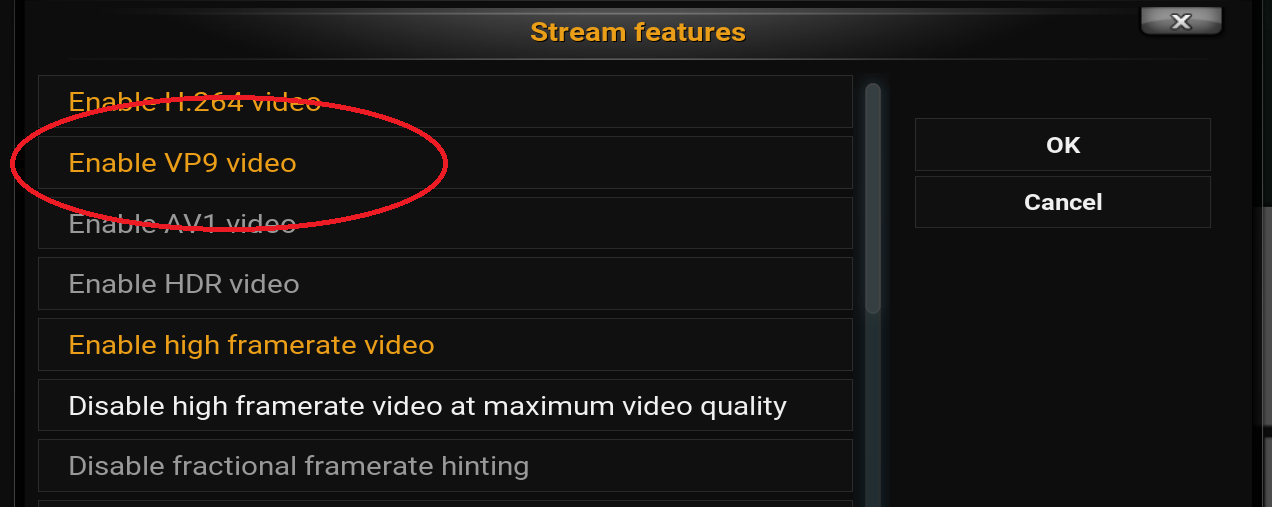
Simply disable the codec - In the YouTube addon - go to the configuration page and under the “General” tab select “Stream Features”. Here simply turn off or disable the “Enable VP9 video” option. This will force the YouTube addon to select another codec to render your video file:
I recognize that this arguably is a “workaround”, however it works for my needs in being able to more reliably play Trailers.