
This article describes how to install a Github Kodi Program Addon "Manage Kodi Favourites" that allows you to easily organize (manage) your Kodi Favourites list by Color coding entries as well as allowing you to add a Prefix or Suffix to your list item and colour code them. I also show you how to install the MB-KODI repository that has the latest version of the Addon (also hosted on GitHub).


The "Manage Kodi Favourites" Program Addon is configurable, meaning that it has a Configuration panel that allows you to update the default picklists for the Colors as well as the Prefix and/or Suffix you would like to modify.

Issue - Why The Need for the Addon
In order to better manage your list of favourites in Kodi - it is important to be able to use Prefixes and Suffixes as well as add Colors to help organize your favourites. Also there is a need fora "Sort" function that will alphabetize your list entries.
I have another Program Addon - the "Insert/Swap Kodi Favourites" Program Addon that allows you to easilly move around entries in your list but it does not allow you to sort your entries or add a prefix, siffix or colors. Therefore, I deveoped a new replacement Addon that incorporates the capabilities of "Insert/Swap Kodi Favourites" but adds these new features.
Requirements Specification for the Addon
Prior to starting the Addon, a preliminary requirements spec was created to establish what the Addon might look like.. If you want a sneak peek into the design process - here is a look at those early requirements for the Addon:
The "Manage Kodi Favourites" Kodi Program Addon allows you to manage your Kodi favourites by sorting, inserting or swapping items and/or adding a prefix, suffix and color to you Kodi favourites
 (
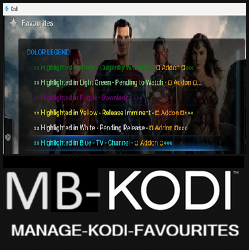
(
Program Addon: Manage Kodi Favourites
This is a simple & lightweight KODI Program Addon that lets you quickly manage your Kodi favourites list that works on multiple Kodi skins. Use this Program Addon to easilly Manage (i.e. move, sort, add a prefix or suffix and color code Favourites) by inserting or swapping entries, using the sort function and/or adding Color, prepending a Prefix or appending a Suffix to entries in your Kodi Favourites list.
[!NOTE] (Latest) - This is the latest version of the Manage Kodi Favourites
Supported by MB-KODI ✔️
Latest Version Manage Kodi Favourites :sunglasses:
- Added ability for users to add a Prefix, Suffix and/or Color each. Set the default actions in the configuration panel and easily and graphically modify entries in the Kodi Favourites list
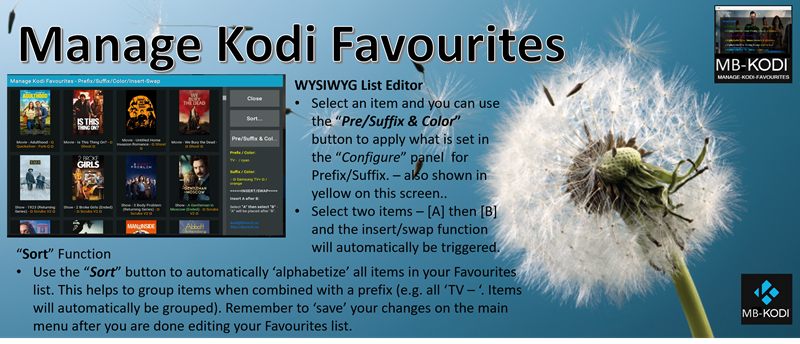
- Added ability to “Sort” Favourites
- Added Help screens (Latest)
Manage-Kodi-Favourites-2.3.zip (Latest)
This MB-KODI Manage Kodi Favourites Program Addon is published as a Kodi Program Addon that you can install directly into Kodi or via the MB-KODI Repository. It is a publicly available Kodi Addon supported by MB-KODI.
Installation Instructions
1 - In Kodi use the “File Manager” to add a new ‘source’ pointing to one of these sources:
- http://borsch.myqnapcloud.com:8089/Manage-Kodi-Favourites
- https://m-borsch.github.io/Manage-Kodi-Favourites
2 - In Kodi use the “Addons” - “Install from zip” option to install the Addon utilizing the ‘source’ that you added in the previous step
How to use:
[!IMPORTANT] Depending on the settings you set in the configuration/setting panel, this Addon will either Add a Prefix/Suffix to items and/or add a Color to items in your Favourites list as well as allow users to easily and graphically Sort or Move items by inserting/swapping entries or using the built-in Sort function.
Pickists:
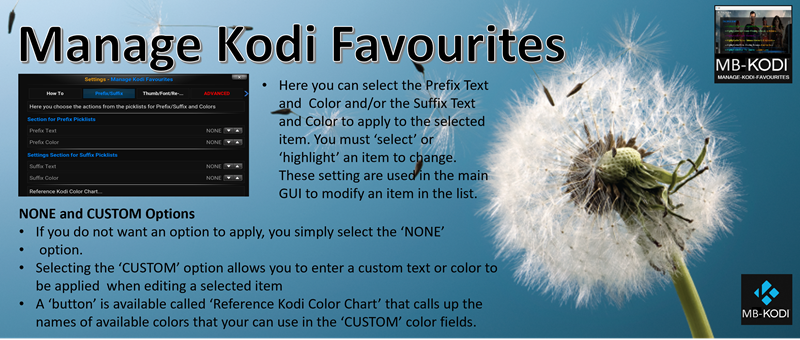
Default Picklists are provided, however if you do not want an action to apply, you simply select ‘None’. Also, you can provide a ‘Custom’ entry by selecting the ‘Custom’ option and an editable text field will appear. This applies to Prefix, Suffix and associated Colors.
Prefix Pickists:
Text - Select the Text to be “prepended” to a selected item. e.g. “NONE,TV - ,Movie - ,Show - ,Custom”
Color - Select the Color to be applied to the Prefix. e.g. “NONE,green,yellow,blue,cyan,orange,purple,white,Custom”
Suffix Pickists:
Text - Select the Text to be “appended” to a selected item. e.g. “NONE, - # Samsung TV+ #,Custom”
Color - Select the Color to be applied to the Suffix. e.g. “NONE,green,yellow,blue,cyan,orange,purple,white,Custom”
ADDON Main Menu
1) Manage Your Kodi Favourites…
Opens a dialog where you can view and reorder your Favourites items usin the Insert/Swap functionality or add a Prefix with Color and/or a Suffix with Color.
Add a Prefix and Color or Suffix and Color
- To modify an items, select an item “A” to “mark” it, then select “Pre/Suffix..” button to apply the current settings as displayed on the dialog in yellow
(If an item is marked, you can select it again to unmark it.) - Press the Close button to close that dialog when you’re done editing (your changes won’t be saved yet).
- If you’ve made some mistakes and want to start over, press the “Abandon Changes…” button to restore the favourites order from the Kodi favourites file. This will undo your unsaved changes.
Insert/Swap
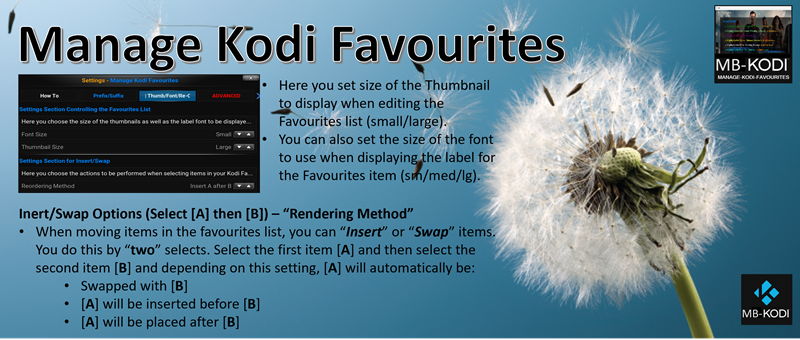
- To reorder items, select an item “A” to “mark” it, then select another item “B” to either “SWAP” or “Insert”.
(If an item is marked, you can select it again to unmark it.) - Press the Close button to close that dialog when you’re done editing (your changes won’t be saved yet).
- If you’ve made some mistakes and want to start over, press the “Restore…” button to restore the favourites order from the Kodi favourites file. This will undo your unsaved changes.
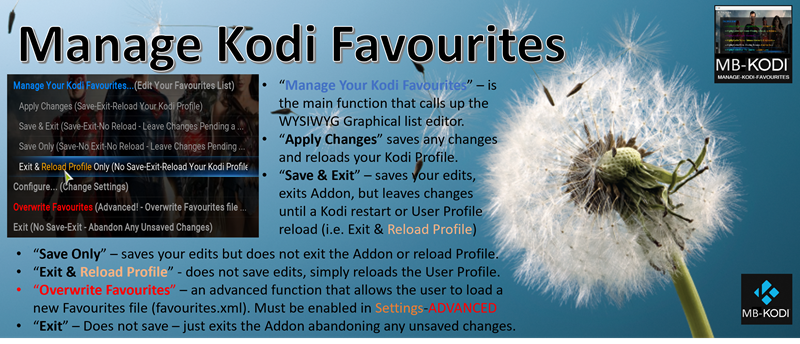
2) Apply Changes (Save-Exit-Reload Your Kodi Profile)
Saves your changes and reloads your Kodi profile, so your changes can be seen immediately instead of you having to restart Kodi to see them.
3) Save and Exit (Save-Exit-No Reload Your Kodi Profile)
Saves your changes, exit the Addon but doesn’t reload your Kodi profile (as this operation can crash in some Kodi builds and you may wish to wait to reload your profile). After using this, you have to manually restart Kodi or use the ‘Reload Profile’ option within this Addon to see your changes.
4) Save Only (Save-No Exit-No Reload Your Kodi Profile)
Saves your changes but doesn’t exit the Addon nor reload your Kodi profile. This option allows you to save your changes but keep working. After using this, you have to manually restart Kodi or use the ‘Reload Profile’ option within this Addon to see your changes.
5) Exit & Reload Profile (No Save-Exit-Reload Your Kodi Profile)
Exits the Addon and Reloads your Kodi Profile. Use this to load the last saved version of your Kodi Favourites file with all your recent changes.
6) Configure…(Change Settings)
Call up the Settings Dialog to change default Insert/Swap actions, Thumbnail size, Font size on labels and Colors as well as set the Prefix and Suffix text.
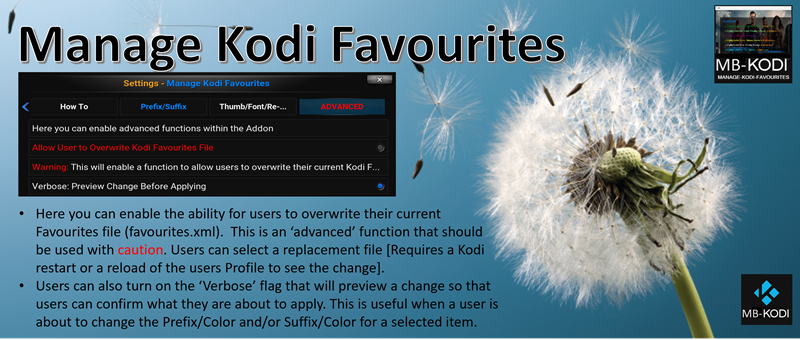
7) Overwrite Favourites File (Advanced - Overwrite Favourites Files…)
This is an advanced function and should be used with caution. It allows users to manually overwrite their favourites file (favourites.xml) with a new file of the same name. Users must enable this option in the Configure-Settings-Advanced section of the configuration panel for the Addon.
8) Exit (No Save-Exit-Abandon Any Unsaved Changes)
Abandon your edits. Just steps back from the Addon, no saving.
Help Screens Available in the Addon
Overview:
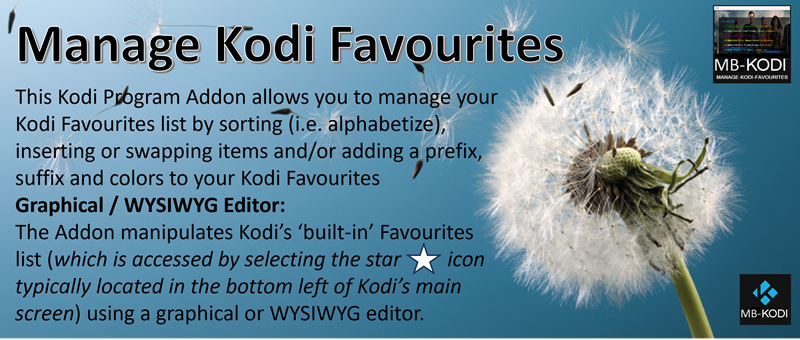
Settings - Prefix / Suffix:
Settings - Thumb / Font / Reorder / Insert/Swap:
Settings - ADVANCED:
Main Menu:
GUI - Graphical User Interface:
Repository and Addon Now Published on GitHub - How to Load
Here is where you can find the MB-KODI Repository that has a Program Addon "Manage Kodi Favourites" included. Simply add a source in your Kodi file manager using the Repository Web Address below. Then "Install from zip" and use the source that you added to load the repository. Kodi will load the Repository. Then under Addons - use "Install from Repository" and use the newly installed "MB-KODI" repository to install the "Manage Kodi Favourites" Program Addon.
MB-KODI Repository Code (on github.com)
Repository Web Address: https://m-borsch.github.io/MB-KODI/
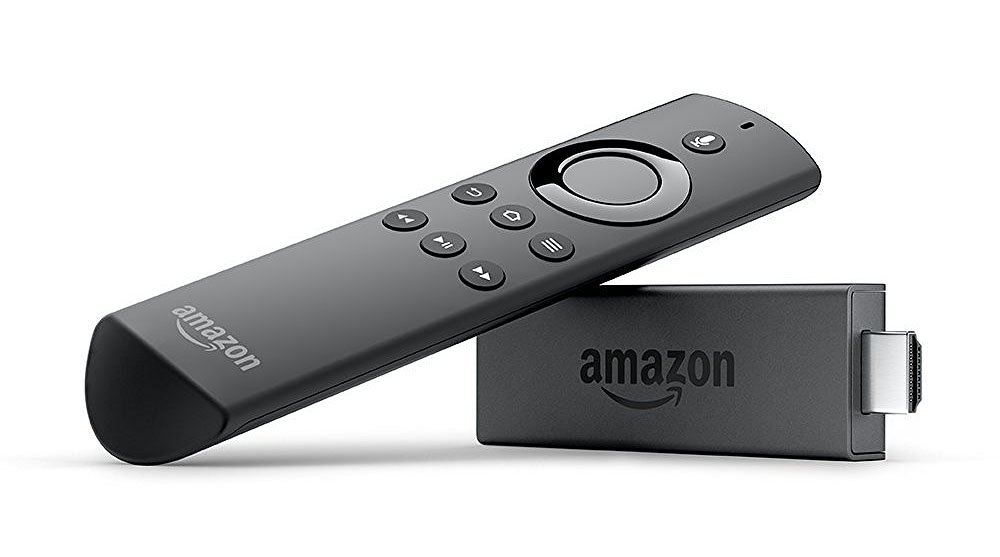
Looking to Load Kodi on to a Firestick? Be Sure to Check This Out!
Need simple steps to “side load” Kodi on to a Firestick, Check out this article.
 How To? - Install Kodi on an Amazon Firestick